 TOTS
TOTS 
About TOTS
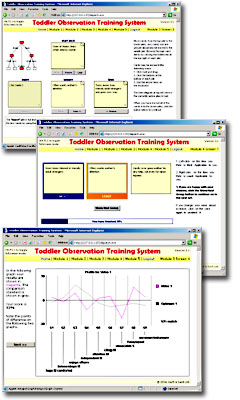
Welcome to the home page for the Toddler Observation Training System (TOTS).
Please check the System Requirements below before running the program.
TOTS is for training purposes only and is available free of charge. However, if you wish to use the TAS45 observation system itself, please send a query to contact@suchandsuch.biz requesting website instructions and a user access code. There may be a charge for this service.
What's New?
10 May 2015: Version 3.4.0 released. This version fixes compatibility problems with Windows Vista/7/8 and includes updated Java applets digitally signed by us. On Windows XP you may use the Minimal Installer to upgrade an older copy of TOTS. On Windows Vista, 7, 8 and newer, this installer will remove any older copy of TOTS so you will need to use the Complete Installer.
28 March 2007: Version 3.3.0 released. This version fixes problems encountered with the Online Data Capture utility, video playback in Internet Explorer, and a few other minor bugs. Please use the minimal installer to upgrade older copies of TOTS.14 August 2006: Version 3.2.1 maintenance release. Includes corrected items.
28 July 2006: Version 3.2 of TOTS has been released. This new version includes an updated item set, an additional nine-pile sorting screen in Module 1, two new Modules 4 and 5 introducing the newer Trilemma sorting method, and an improved user interface.
Download TOTS 3.4.0
- Complete Install - 147MB - Program and video files.
- Minimal Install - 1.77MB - Program only, no video files.
Upgrading TOTS 2.7.x, 2.8.x or 3.x (including betas)
On Windows Vista, Windows 7 or Windows 8/8.1 and newer, the installer will remove any older copy of TOTS. User registrations in the old version will not be preserved. Please use the Complete Installer for inclusion of the video files.
On Windows XP, you can upgrade an older copy of TOTS by downloading the Minimal Installer for TOTS 3.4.0 and installing it over the top of your previous copy. This will preserve all user-registrations made in the older version, and the video files. Make sure you install 3.4.0 into the same folder as your older copy to preserve user-registrations (default C:\Program Files\TOTS). If the installer asks if you want to replace any older files, click "Yes" or "Yes to all".
System Requirements
- Windows XP or newer.
- TCP/IP networking must be installed.
- Internet Explorer (IE) 5.5 or newer.
- Java must be installed.
- Windows Media Player 9 or newer must be installed to play the video files.
Troubleshooting
These are problems which you may encounter (which we know about) and steps to take to try and resolve them.
| Problem | Solution |
| Java applets are prevented from running. | This problem has been addressed in TOTS version 3.4.0 and newer. |
| When using the Online Data Capture utility, you receive the error message "Bad code". | This problem has been addressed in TOTS version 3.3.0 and newer. Please use the minimal installer to upgrade older copies of TOTS. |
| The video files do not play in Internet Explorer 7. | This problem has been addressed in TOTS version 3.3.0 and newer. Please use the minimal installer to upgrade older copies of TOTS. |
|
When trying to install the program, you receive an error message beginning
"Installer User Interface Mode not Supported..." (All versions earlier than 3.2) |
Please download and try version 3.2 or newer. Since version 3.2, the installer has been built using a newer package which should not have this problem. |
|
The program fails to connect to http://tots/ (versions 2.7.x and 2.8.x only) |
After launching TOTS, try entering http://127.0.0.1/ into your web browser's address bar and press Enter. If this works, you can change the program to launch directly to this address by using a text editor such as Notepad to edit the "microweb.ini" configuration file in the TOTS install folder (default C:\Program Files\TOTS). Near the top of the file, change the line hostName=tots to hostName=127.0.0.1 . Save and close the file, and relaunch TOTS. |
| My problem is not listed. | Send a query to the address below. |
More Information
Queries may be sent to contact@suchandsuch.biz.